Claude Code Mods Explained: Build One in Three Files, Know What It Can Reach
A Claude Code mod is a plugin with one JavaScript or TypeScript file that runs inside Claude Code, so it can draw panes and status lines, add instant slash commands, and stop or rewrite tool calls. This guide shows the three files, how to run Anthropic's Token Weather mod, how to have Claude write one, and what a mod can reach on your machine.
The first example mod in Anthropic's mods overview is about twenty lines of JavaScript.
Load it, and Claude Code's spinner stops saying only "Thinking". It says Thinking · tool calls: 3…, and the number climbs each time Claude reaches for a tool.
The mods overview shows the whole file. Claude Code runs it and draws the count itself.
A Claude Code mod is a plugin with one JavaScript or TypeScript file. Claude Code calls that file's functions when something happens: a tool call, a submitted prompt, part of the screen being drawn. Each function can watch the event, change it, or handle it instead.
Mods were announced on October 1, 2026, and they are on by default in the terminal from Claude Code v2.1.287.
You probably have some customization already. Your setup might include a settings hook that blocks a command, a status line script, or a few skills. The overview says these work from outside Claude Code: each one "runs a script, or gives Claude text or tools."
A settings hook runs a shell command when an event fires and hands back a verdict. A mod runs inside. It sees the event before Claude Code acts on it, and can keep state between events. That position sets what a mod can do and what you have to trust it with.
Joe Karlsson, a developer who moved his rules from hooks to mods, found that five of his hooks "never worked at all without me noticing."
One printed "BLOCKED". Then it let the write go through anyway.
Nothing on his screen said so.
Karlsson switched because of that silence. Hooks "can break without telling me," he wrote, and mods fix that "because they can show me they ran."
What can a mod change that hooks and skills can't?
The announcement puts the gap in one line: "hooks can't rewrite events, draw new UI, or replace features. Mods can."
The mods overview lists five things a mod can do that settings hooks, skills, status lines and MCP servers can't:
- Draw an interface you can use: a pane beside the transcript or a band above the prompt, with tabs, buttons and text fields.
- Redraw Claude Code's own interface: a tool call's row, the spinner, or the dialog Claude asks questions in.
- Step into a tool call or a request: hold a call while it asks you something, answer it without running the tool, or send one request to a different model.
- Run your own code on a command: a
/commandthat runs at once, "with no Claude turn, even while Claude is working." - Share data between its own functions: what one records, another can show.
Replacing features has already started on Anthropic's own product: the built-in /diff pane is now a mod, so you can turn it off in /plugin or replace it.
Mods add to the older tools. A plugin can carry a mod, a skill and an MCP server side by side, and each does a different job. If you want a refresher on how plugins, skills and MCP servers divide the work, Build to Launch's comparison of MCP, plugins and skills in Claude Code covers the three.
The docs' own comparison puts mods beside settings hooks, skills and MCP servers:
Table: Four ways to extend Claude Code
| What it is | Draws on screen | Pick it when | |
|---|---|---|---|
| Mod | Functions Claude Code calls in its own process | Yes | You want a pane, a band, a custom command, or to rewrite an event |
| Settings hook | A shell command, HTTP request or prompt run on an event | No | You want to block, allow or log an event with a script you have |
| Skill | A SKILL.md file of instructions Claude reads | No | You want Claude to follow instructions you wrote |
| MCP server | An outside process or service that gives Claude tools | No | You want Claude to reach new tools or data |
Source: the comparison table in the Claude Code mods overview. The last column for skills and MCP servers restates their definitions. A mod is the only one that draws.
Three files make a mod
A mod is an ordinary plugin with one extra key.
The create guide lays out the folder:
first-mod/
├── .claude-plugin/
│   └── plugin.json
└── hooks/
    ├── hooks.json
    └── register.js
plugin.json is the plugin's manifest: name, version, description. register.js is your code, which the docs call the hooks module.
hooks.json connects the two. Its modules key points at your code:
{
  "description": "The first-mod hooks module",
  "modules": ["./register.js"]
}
The docs say that listing a module there "is what makes the plugin a mod." You don't need Node.js, a bundler or a build step. Claude Code loads .js and .ts files directly.
Every hook gets three things: $, e and next
Inside register.js, you export a function named register. Claude Code calls it once when the mod loads and hands it on. Each call to on attaches a function, called a hook, to one event. Every hook receives the same three arguments, which the create guide names:
$, the mods API: every method a mod can call to reach outside its own file, such as$.uito draw and$.commandto add a command.e, the event: plain data about what is happening, such as a tool call's name and arguments.next, the next handler: passes the event on to other mods and then to Claude Code's own behavior.
Lydia Hallie of Anthropic sums up the third one in her walkthrough video: "whatever you pass to next is what Claude Code actually goes and does."
So a hook has three moves:
- It can observe, by doing its work and passing the event on unchanged.
- It can rewrite, by passing a changed copy.
- Or it can answer, by returning its own result and never calling
next, so Claude Code's usual behavior doesn't run.
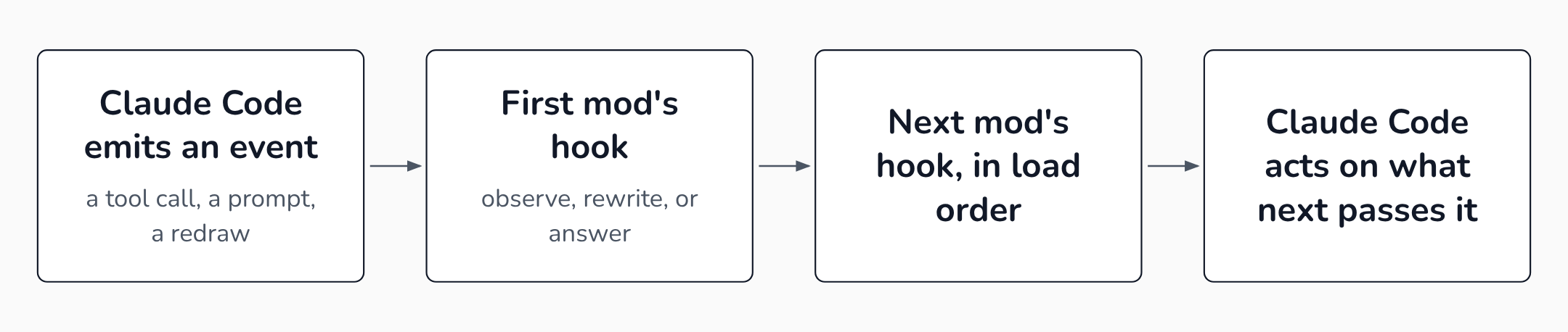 Each hook passes the event on with next, passes a changed copy, or answers it so nothing after it runs.
The spinner counter from the opening uses the first two moves.
Read the two on calls. The first one counts, calls $.ui.invalidate to ask Claude Code to redraw the screen so the new count shows, and lets the tool run. The second one rewrites the spinner each time it is drawn.
let calls = 0

export function register(on) {
  on('tool.call', async ($, e, next) => {
    calls += 1
    $.ui.invalidate('ui.render')
    return next(e)
  })

  on('ui.render', { component: 'Spinner' }, async ($, e, next) => {
    return next({ ...e, props: { ...e.props, suffix: ' · tool calls: ' + calls + '…' } })
  })
}
The { component: 'Spinner' } argument is a matcher, a filter on the event's fields, so that hook runs only when the spinner is drawn.
Notice the copy in the second hook. The event is frozen. As the events guide warns, "assigning to a field throws."
You change an event by handing next a new one.
Answering looks different. This hook, also from the events guide, refuses every Bash command:
on('tool.call', { tool: 'Bash' }, async () => {
  // No call to next, so the command never runs
  return { deny: 'Bash is turned off in this project. Use the file tools.' }
})
When several mods hook the same event, they run in the order they load.
The announcement says "the first mod to load sees the event first and the result last," which is how mods from different authors stack.
Where a mod draws, and where it only runs
Each place a mod can draw is a render site.
The interface guide maps them:
- a pane: a sidebar beside the transcript in a wide fullscreen terminal, or a framed region above the prompt otherwise
- a toast at the top right of the transcript
- a log line in the transcript
- a band directly above the prompt
- a status line under it
A mod can also redraw Claude Code's own messages, tool call rows and spinner. All mods share the band. Every mod that draws there draws into the same strip.
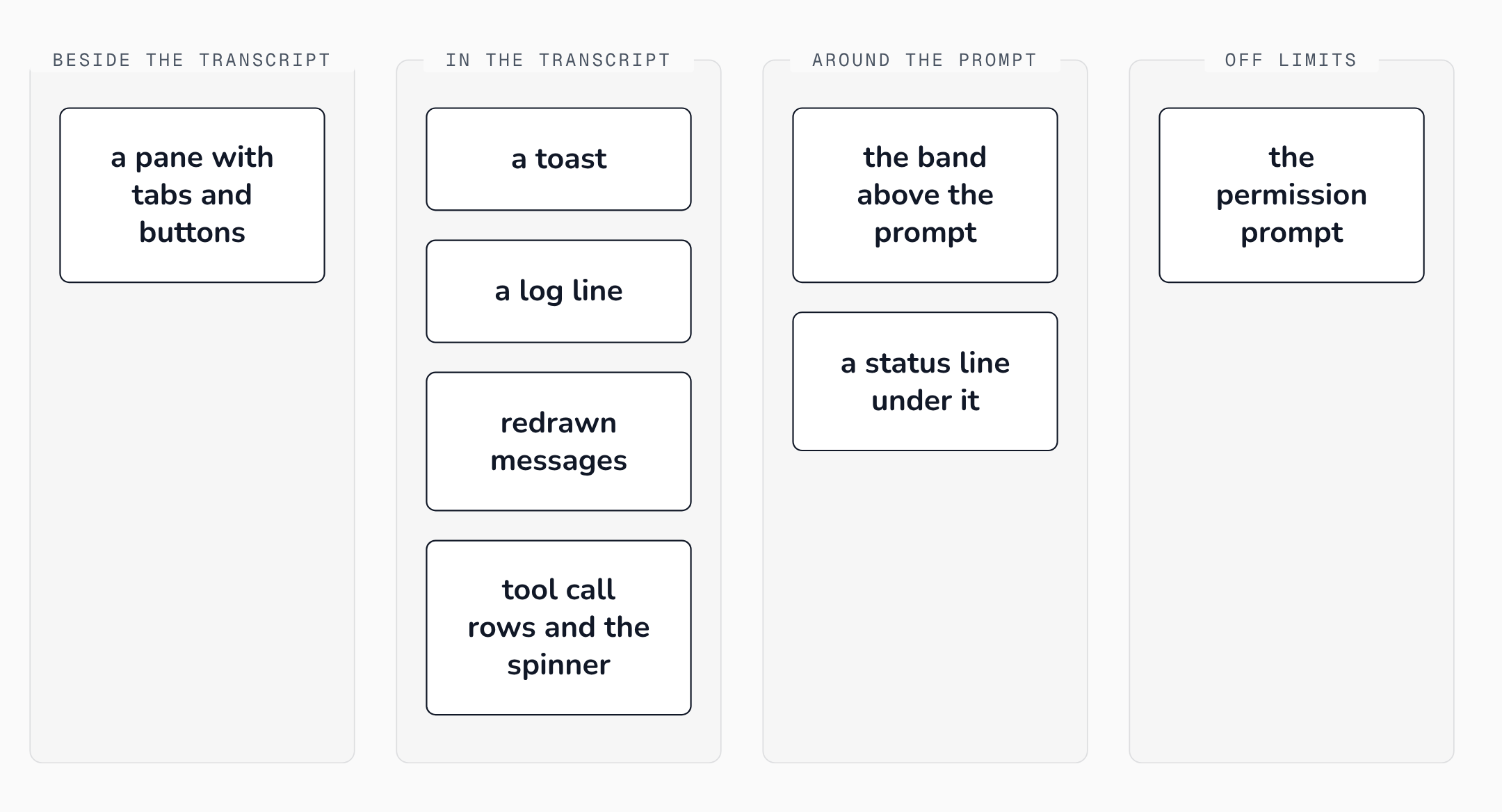 A mod can add a pane, a toast, the band and a status line, and redraw Claude Code's own rows, but never the permission prompt.
One part of the screen is off limits.
"The permission prompt isn't a render site, so a mod can't change what it shows," the interface guide says. Whatever a mod redraws, the prompt that asks you to approve a tool call stays Claude Code's own.
Drawing also changes only the screen. Hallie built a mod that hides email addresses until she hovers. She made it for recording videos.
When she then asked Claude to write a message, "it still uses the real email address," because the render hook never touched what the model saw.
Where you run Claude Code decides what you see. The overview's table separates the two halves of a mod:
Table: Where mods run and where they draw
| Where you run Claude Code | Hooks run | Drawing appears |
|---|---|---|
claude in a terminal | Yes | Yes |
| The Desktop app's Code tab (not WSL) | Yes | Yes |
| The VS Code extension | Yes | Yes, from extension 2.1.299 |
claude -p and the Agent SDK | Yes | No |
| A cloud session | Yes, if the plugin reaches it | No |
Source: Claude Code mods overview. A guard still guards in claude -p; its pane never appears.
How do you install a Claude Code mod and turn it off?
Start with the version. Mods need Claude Code v2.1.287 or later in the terminal, and the Desktop app's bundled copy has them from v2.1.286. Run claude --version to check.
If you set CLAUDE_CODE_ENABLE_FUNCTION_HOOKS during early access, remove it.
The overview says v2.1.287 and later ignore it, "so setting it to 0 doesn't keep mods off."
A mod reaches your session one of two ways:
- For one session, from a folder:
claude --plugin-dir ./first-modloads it without installing it. Claude Code watches the folder and reloads the mod each time you save a file. - Installed from a marketplace: a marketplace is a catalog of plugins, kept in a GitHub repository or a local folder. You add it once with
claude plugin marketplace add, then install from it by name:claude plugin install <mod>@<marketplace>in your shell, or/plugin installinside a session. If a session is already open, run/reload-pluginsin it.
To see what loaded, run /plugin. A dim line under the tabs reads something like 1 mod active · first-mod.
Switching off takes one of three steps, from narrow to broad:
- One mod: disable it in the Installed tab of
/plugin. - Every mod, for one session: start with
claude --safe-mode. - Every mod you installed, everywhere: set
"disableAllHooks": truein~/.claude/settings.json. That also stops your settings hooks and custom status line.
Are Claude Code mods safe?
A mod runs with your access. So it is as safe as the person who wrote it.
The overview lists what a loaded mod can do:
- Read and write files anywhere your account can, start programs and make network requests.
- Read secrets in environment variables and settings files.
- See every prompt and tool call, and rewrite them.
- Approve a tool call before you're asked.
- Call a model on your plan.
"Mods aren't sandboxed," the overview says.
Turning on Claude Code's sandbox doesn't change that. The sandbox isolates the Bash commands Claude runs, "and a process that a mod starts runs outside it."
Your permission rules don't cover a mod either. They govern Claude's tool calls.
The admin guide gives the consequence: "With Read(.env) denied, a mod can still read that file with $.fs.read." Backslash Security tested exactly that on Claude Code 2.1.291, on a personal and a Team account. Claude Code denied Claude a test .env file, "and the mod read that same file anyway."
On a machine without managed settings or a Team or Enterprise login, a mod can also approve a call that your own ask rule or PreToolUse hook would have stopped.
You can run a check first. The $ argument makes it possible.
A hook can only draw, read a file, start a process or reach the network by calling the mods API. "A hook has no other way to do those things," the overview says, "which is why Claude Code can list what a mod does before you install it."
Run it on any mod's folder:
claude plugin validate ./first-mod
 ❯ ./register.js hooks: session.start, tool.call, command.run{command=tally}, ui.render{component=Spinner}
 ❯ ./register.js calls: $.command.register, $.ui.invalidate
 ✔ Validation passed
That output, from the create guide, is the tool-call counter with a /tally command added.
The hooks: line names the events, and the calls: line names everything it asks Claude Code to do. A counter that listed $.http.fetch or $.process.run would deserve a closer look.
The listing has a limit. Backslash points out that it names the functions a mod calls, "but not which files or addresses it touches, so read the code too."
None of the sources for this article found a confirmed malicious mod in use.
The risk they describe is the documented reach: anything you can do on your machine, a mod you install can do too.
A crashed mod stops guarding
A broken mod doesn't stop your session. For a guard, that means the check stops while the session goes on.
If a tool.call hook throws or times out, the events guide says, "Claude Code skips it and the command goes on as it would without the mod."
The troubleshooting guide puts the risk plainly: "a broken mod can look like one that does nothing."
The OneWave team, which built twelve mods in one night, watched their spending meter vanish, and the only sign was one dim transcript line: ui.render hook skipped: threw TypeError. Karlsson adds that the line only reaches the transcript for mods you load from a folder. "For mods installed from a marketplace, the note only goes to a debug log."
The fix the docs give is a .catch handler chained onto the registration that on returns. With one, a guard that fails refuses the call instead of letting it through. In this example from the events guide, guard is your hook function:
on('tool.call', { tool: 'Bash' }, guard).catch(async ($, e, next) => {
  // guard had already called next, so return what came back
  if (next.called) return next(e)
  return { deny: 'The command guard failed, so this command was not run: ' + next.error.kind }
})
That handler covers only the guard's own failure. Installed mods share one worker, a single background thread that runs their code. Claude Code unloads a mod that crashes it. After 3 crashes, the troubleshooting guide says, every mod that isn't built in is off for the session. Your guard goes with them. A .catch can't stop that.
Karlsson kept his old blocking hooks running "as a backup anyway."
Command-reading guards have a second limit: they match the text of a command. OneWave's launch-codes mod caught Claude starting a recursive delete.
Claude then "rewrote the cleanup as a file-by-file delete, and moved on."
Kushal Banda's turn-summary mod reads the commands Claude runs to spot file writes and test runs. He wrote 30 edge cases for it to test that reading. The first version missed many. Banda lists "quoted paths, sudo tee, a cd before a write."
Anthropic's own Blast Radius mod holds risky commands such as rm -rf and shows what they would change.
Addy Osmani of Anthropic describes it as "a safety net rather than a real firewall. It reads the command text, so $(…), aliases and scripts that call rm will get past it. If you want a hard block, use permission rules."
Run Token Weather, then have Claude write your own
Anthropic shares three sample mods in its claude-code-playground repository. Token Weather draws a forecast of your context window above the prompt.
Osmani's guide gives its scale: "under 25% ☀ Clear" up to "90% and up ↯ Compact soon."
Token Weather only draws. That makes it a good first mod. These steps take you from running it to keeping a mod of your own.
-
Check your version. Run
claude --versionand update if it is below 2.1.287. -
Run Token Weather for one session. Clone the repository and load the mod from its folder:
git clone https://github.com/anthropics/claude-code-playground.git cd claude-code-playground/claude-code/mods claude --plugin-dir ./token-weather -
Read what it does. Run
claude plugin validate ./token-weatherand read thehooks:andcalls:lines. Open the hooks module and check that the code matches them. -
Keep it, if you like it. From the same folder, the playground README installs it for every session. The folder is itself a marketplace named
claude-code-playground-mods, so you add it withclaude plugin marketplace add ./and then runclaude plugin install token-weather@claude-code-playground-mods --scope user. -
Ask Claude for one of your own. In a session, describe it. The create guide's example is
make a mod that shows the current git branch above the prompt. Claude works from a built-in skill calledplugin-authoring, and writes the files into~/.claude/dev-mods/under the session's ID. In the default permission mode, Claude Code asks you to approve each file. Accept hot reload when it asks, and the mod loads at the end of the turn. -
Move it somewhere permanent. A mod Claude writes this way loads only in the session that made it, and Claude Code deletes that folder later. Copy the mod's directory out, for example to
~/mods/git-branch, and load it withclaude --plugin-dir ~/mods/git-branch. -
If it guards anything, give it a
.catchhandler like the one above. Keep your permission rules for anything that must never run.
Once those work, community collections are the next place to look.
Build to Launch's Claude Code mods guide sorts 69 mods by what they do: watch cost and usage, change how Claude works with you, or change what you see on screen.
hamzafer/claude-code-mods, with 409 stars as of November 3, 2026, adds a context bar, a usage meter and its own Blast Radius. Its README carries the rule for every collection: read the code before you install.
What you build is your call. Karlsson offers a useful test: "if a rule in CLAUDE.md exists because something went wrong on a specific day, make it a mod."
A rule like that should run every time, whether or not Claude remembers it.
For everything else in your Claude Code setup, Build to Launch's Claude Hub gathers the rest.
FAQ
Do Claude Code mods work in VS Code?
Yes. A mod's hooks run in the VS Code extension, and what it draws appears from extension version 2.1.299.
The panel labels drawn content with the plugin's name, according to the interface guide.
Does a mod use your Claude usage?
Only when it calls a model. Drawing and hooks run locally, but a mod can call a model on your plan or API key.
The overview lists that among what a loaded mod can do. Check its calls: line for a model call.
Do you need to know how to code to use mods?
No. /plugin installs published mods.
Claude can also write a mod from a description using its built-in plugin-authoring skill, as the create guide explains. Reading a mod's code before installing it still helps.
What happens to your mods when Claude Code updates?
They may need fixing. Anthropic's mods README warns that the API "may change between releases without notice."
Karlsson counted "about a dozen releases in the two weeks after mods launched."
Claude Code writes type declarations for your version into each mod's .claude-plugin/types/ folder. The create guide says to trust those over any page.
Sources
- Claude, Customize Claude Code with mods, 2026-10-01
- Claude Code Docs, Mods overview
- Claude Code Docs, Create a mod
- Claude Code Docs, React to events with a mod
- Claude Code Docs, Draw in the interface with a mod
- Claude Code Docs, Troubleshoot a mod
- Claude Code Docs, Manage mods for your organization
- Anthropic, claude-code mods README
- Anthropic, claude-code-playground mods
- Addy Osmani, Getting started with Claude Code Mods, 2026-10-28
- Claude, Mods in Claude Code: change how Claude Code works, 2026-10-05
- Build to Launch, Claude Code MCP vs Plugins vs Skills
- Build to Launch, The Claude Hub
- Joe Karlsson, First impressions of Claude Code mods
- OneWave AI, Claude Code Mods: What They Are, and the Ten We Open-Sourced, 2026-10-02
- Kushal Banda, Claude Code Mods Explained: What They Can Do That Hooks and Skills Can't
- Backslash Security, Claude Code mods: What they are, and what you should be aware of, 2026-10-12
- hamzafer, claude-code-mods
Links
- Customize Claude Code with mods (documentation)
- Mods overview - Claude Code Docs (documentation)
- Create a mod - Claude Code Docs (documentation)
- React to events with a mod - Claude Code Docs (documentation)
- Draw in the interface with a mod - Claude Code Docs (documentation)
- Troubleshoot a mod - Claude Code Docs (documentation)
- Manage mods for your organization - Claude Code Docs (documentation)
- anthropics/claude-code mods README (documentation)
- anthropics/claude-code-playground mods (documentation)
- Getting started with Claude Code Mods (Addy Osmani, Anthropic) (documentation)
- Mods in Claude Code: change how Claude Code works (Claude, YouTube) (documentation)
- Claude Code MCP vs Plugins vs Skills (article)
- The Claude Hub (article)
- First impressions of Claude Code mods (article)
- Claude Code Mods: What They Are, and the Ten We Open-Sourced (article)
- Claude Code Mods Explained: What They Can Do That Hooks and Skills Can't (article)
- Claude Code mods: What they are, and what you should be aware of (article)
- hamzafer/claude-code-mods (article)
New guides on building with AI come in the Build to Launch newsletter.
More guides
Claude Code Hooks Fail Open by Default: What onFailure "block" Fixes and What It Misses
A guard hook protects you only on the days it runs. Claude Code v2.1.295 added a per-hook switch that blocks when the guard breaks, but you have to set it, and it cannot catch a script that runs and says all is well.
Grok Bot vs Muse vs ChatGPT Dots: Which Personal Agent to Try First
Compare Grok Bot, Muse and ChatGPT dots on accounts, price, country rules and tasks, then pick the first personal agent to try.
Claude Sonnet 5.5 Migration: The Breaks That Return 200 Are the Ones to Test For
Four of the five documented Claude Sonnet 5.5 breaking changes return a 400 you can find in staging. The ones that return 200 need a pre-upgrade test that checks for what is missing.