Adding Jev to Your App: What Its Confidence Score Means, What It Costs, and Where It Fails
Learn what Jev does, how to turn its confidence scores into code paths, what a call costs, and which decisions to give it before adding it to your app.
Jev returns a typed decision with a probability instead of text. This guide shows the real request and response, how to turn its confidence score into code paths you can defend, what a call costs, and which decisions belong on it.
One call to Jev sent a support ticket and three questions through a gateway, a service that forwards requests to model providers. It used 447 input tokens and cost $0.000018774.
A million tickets that size come to about $19.
The answers came back as a team name, an urgency level, and a yes/no probability.
No sentence came back at all.
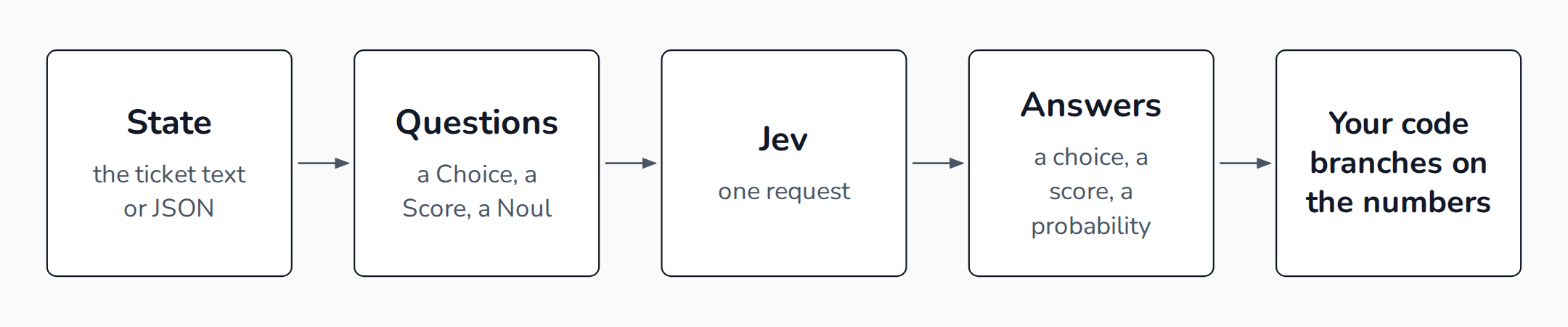
TypeSafe AI's Jev works that way. TypeSafe released it on 2026-09-15 as a model that does not write text. You send it some text or JSON. TypeSafe calls that the state. Add typed questions about it.
Jev answers each question with a value your code can branch on, plus the probability behind it.
If your app already asks an LLM to pick a category, flag a message, or rate something, that call is the candidate.
Pick a decision your code already branches on
Jev answers three kinds of question.
A Choice picks one option from a list you write, up to 255. A Score rates the state on 2 to 10 ordered levels you describe. A Noul returns the probability that a yes/no statement is true.
The fit test asks whether your code already branches on the answer, and routing a ticket, flagging a message, rating severity, and gating a tool call all pass. TypeSafe lists similar jobs, along with scoring on a rubric and checking a statement against a record.
Anything that needs words fails the test.
Jev does not generate text, write code, or hold a conversation. Jev takes text only. Images and audio need converting first, per the models page.
Exact rules fail it too.
TypeSafe's own list of weak spots says Jev is not a calculator. It reads dates as text. Keep arithmetic and date comparison in your code.
One more boundary matters if you build with Claude Code or Cursor. Jev is not the model behind your coding agent.
TypeSafe says so directly: use your agent as usual to write code that calls Jev.
The call, with the real request and response
Calls go to POST https://api.typesafe.ai/v1/systemone with a bearer key. TypeSafe's quick start uses a Stripe support ticket. This is its request, cut to two of its three questions.
{
  "state": "Hi, I've been trying to connect my Stripe account for 3 days and it keeps failing. I'm losing sales. Please help ASAP.",
  "model": "jev-latest",
  "questions": {
    "department": {
      "type": "choice",
      "instructions": "Which team should handle this",
      "criteria": {
        "billing": "Payment or subscription issues",
        "technical": "Bugs or integration problems",
        "sales": "Pricing or account questions"
      }
    },
    "is_urgent": {
      "type": "noul",
      "instructions": "The message conveys urgency or time-sensitivity"
    }
  }
}
The state carries the ticket. The questions map holds one entry per judgment. Questions in one request cannot see each other's answers. Your code does the combining.
The model never receives the key you pick, such as department, so all the meaning has to live in instructions and criteria.
The answers return under the same keys, cut the same way.
{
  "model": "jev-latest",
  "answers": {
    "department": {
      "type": "choice",
      "choice": "technical",
      "probabilities": { "billing": 0.159, "technical": 0.84, "sales": 0.001 },
      "confidence": 0.596
    },
    "is_urgent": { "type": "noul", "noul": 0.999 }
  },
  "usage": { "input_tokens": 312, "output_tokens": 48 }
}
A Choice returns the winning option, a probability for every option, and a confidence value. A Score answer returns a score that can land between your levels, as 1.6 does on the API reference three-level example. It adds a probability per level and a confidence. A Noul returns one number, the probability of yes. It has no confidence field. So code that reads answer.confidence on every answer breaks on a yes/no.
The usage line belongs to the quick start's full three-question call, at 312 input tokens. The 447-token figure in the opening is a different ticket, from OpenRouter's run, and output tokens cost nothing either way.
What the confidence number is
TypeSafe computes confidence from the probabilities. When the weight sits on one option, confidence is high. When the weight spreads across several options, confidence is low.
Look at the response above. The option technical holds 0.84 of the probability, yet confidence is 0.596.
The two numbers are separate outputs. TypeSafe does not publish the formula in the pages above, so do not try to derive one from the other. Gate on confidence, as TypeSafe advises, and log both. Compare it with the top probability on your own labels, since one tester found it adds nothing beyond the probabilities. A Noul has no confidence, so gate on how far its probability sits from 0.5. Near 1 is a strong yes and near 0 a strong no, while the middle means Jev is unsure.
Pydantic's documentation calls confidence a margin and says it is not a probability that the answer is right. Treat it as a measure of hesitation.
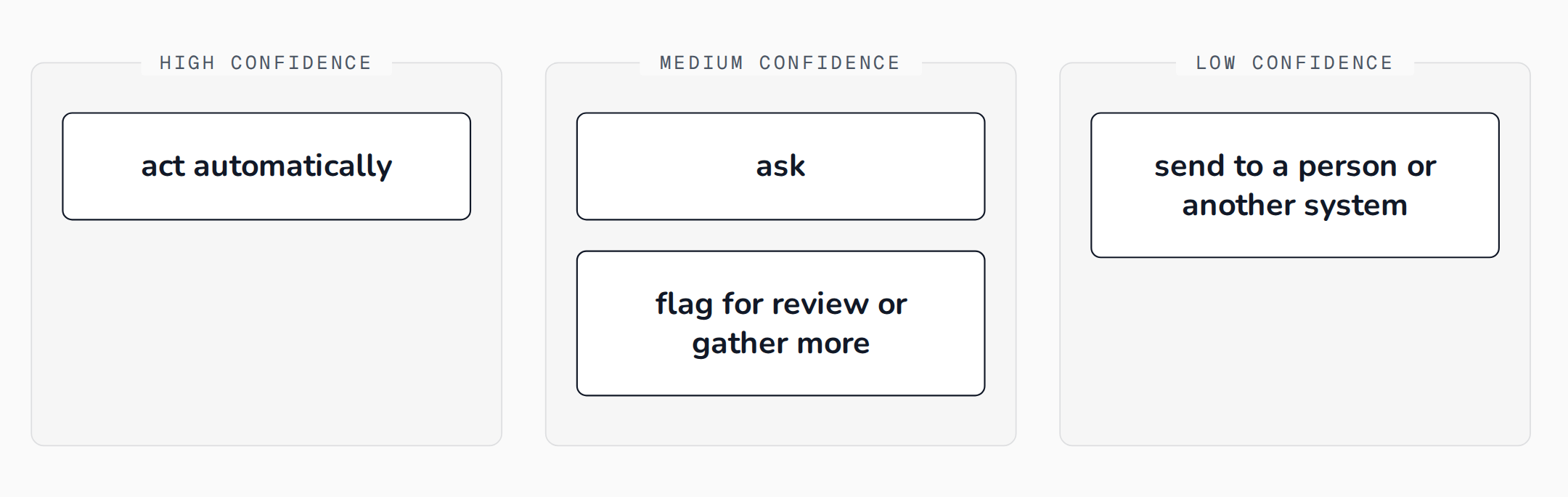
TypeSafe suggests three bands. High confidence lets your code act automatically. Medium confidence calls for caution: ask the user, flag for review, or gather more. Low confidence stops the action and routes the case to a person or another system.
Probabilities shift between calls, so leave margin near a gate and set thresholds on bands rather than exact values. On one OpenRouter ticket, the same message returned a probability of 0.79 on one call and 0.84 on the next.
The bands move with the stakes. TypeSafe's routing example, whose intent question is a Choice like department above, uses a 0.6 floor for everything. Above it, showing a balance needs nothing more, while approving a transfer needs 0.85.
action = response.answers["intent"]
if action.confidence < 0.6:
    route_to_support_agent(account_id)
elif action.choice == "check_balance":
    show_balance(account_id)
elif action.choice == "approve_transfer":
    if action.confidence > 0.85:
        approve_transfer(account_id)
    else:
        ask_user_to_confirm("Just to confirm: you would like to approve this transfer, is that correct?")
else:
    route_to_support_agent(account_id)
Set thresholds from your own labels
Those numbers are examples. TypeSafe's docs say the right values depend on your domain and tell you to test with your own data.
The vendor's one published check is a cookbook on 60 SEC filings. A cutoff of 0.9 split them in half. The confident half was right 90% of the time against 40% for the other half. That run used an earlier build, jev-1.12.
Independent tests disagree about how far to trust it.
Calibration measures how well stated confidence matches how often answers are right. Answers given 0.9 should be right about nine times in ten. Calibration error is the average gap between the two, and zero is perfect.
A model is overconfident when it states more than it delivers, and underconfident when it states less.
One study sent 900 synthetic support tickets through Vercel's gateway. It measured a calibration error of 0.107, 4.4 times the 0.024 that sampling noise alone would give a perfectly calibrated model. The same study found Jev well calibrated on public benchmarks, with errors of 0.024 to 0.032. Its authors expect contamination there, meaning test items that leaked into training.
The errors ran in opposite directions. Yes/no answers were underconfident, while choice and score answers were overconfident. For example, on a priority question whose rule appeared nowhere in the ticket, Jev was right 44.7% of the time at an average probability of 0.74.
A second review reported the same flip by domain. On an emotion-labelling set, labels scored between 0.80 and 0.95 matched the human label 15% of the time, though the review does not say which number it means. On crash narratives, Jev was underconfident.
That review also found Jev the best calibrated of the models it measured on familiar English tasks. But among LLMs that return full probabilities, Jev had the highest calibration error in two studies. The review found no calibration error or reliability plot, a chart of confidence against accuracy, from TypeSafe on any dataset.
So measure it yourself, in two steps.
First, sort your labelled answers into confidence ranges and count how often Jev is right in each. TypeSafe suggests plotting confidence against accuracy on your data. Then set the act band where the error rate is one you can live with, as OpenRouter advises.
Second, if stated confidence runs off from accuracy, rescale it. The same review found that fitting one scaling value, called a temperature, on 50 to a few hundred labels fixed most of the calibration error. A temperature flattens or sharpens every probability the same way. You choose the value that makes confidence match your results, and you fit it per question type. One study's refit values ran from 0.66 for yes/no answers to 3.29 and 3.40 for choice and score, and another reported 0.65 to 4.45 with no single value fitting.
Separately from calibration, give Jev a way to say no.
A forced binary with no "unknown" option makes Jev pick the least wrong answer. A pre-registered study, one whose predictions were written down before any data was collected, found that 0 of 30 out-of-scope messages were flagged at 0.99 confidence.
TypeSafe's Choice docs advise adding other or none of the above whenever the list might miss an input.
Describe every option too. A router given bare option names sent all 40 hard tasks to the cheap model at a median confidence of 0.96, and one-line descriptions fixed 37 of the 40.
Pin the model id. The alias jev-latest moves when a release ships, and thresholds tuned on one version can drift on the next.
What it costs
TypeSafe's models page lists $0.042 per million input tokens, with output free of charge, and each request can hold 64,000 tokens across the state and all questions. The state plus the longest question must fit in 32,000, and OpenRouter lists a 32,000 context window. The page lists 1,200 requests a minute and 250,000 tokens a second. It warns the limits can change without notice.
New accounts get $5 in free credit, since TypeSafe dropped its waitlist on 2026-09-20. At OpenRouter's $0.000018774 a ticket, that covers more than 260,000 tickets.
Because answers are tiny and free, the bill follows the state you send.
Trim it in code. TypeSafe also reports that accuracy falls when the state fills with detail the question does not need.
Ask every question in one request.
TypeSafe's cookbook reports that batching 13 questions was about 11 to 12 times cheaper and about 10 times faster than 13 separate calls. Treat the headline multipliers with care.
Independent tests measured Jev anywhere from 0.5 times to 12.1 times faster and from 0.6 times to 478 times cheaper, depending on the comparison model. TypeSafe's own claim of 193.6 times faster and 444.6 times cheaper comes from four workflows its team built. One review could match the 444.6 figure to a single comparison, against Opus 5.
TypeSafe also writes that it cannot prove its price is not subsidized.
Price is not the only comparison. In a Good Start Labs test, Jev matched Claude Fable 5.1's verdicts 91.5% of the time at $160 per million verdicts. DeepSeek V4.1 Flash agreed 93.5% of the time at $260 per million. Compare Jev with the cheapest model that already clears your accuracy bar.
Where it falls short
On TypeSafe's own four-workflow test, Jev agreed with a reference built from two frontier LLMs 67.8% of the time. GPT-5.6 Sol scored 74.1%.
On invoice processing the gap was 61.8% against 79.1%.
Independent numbers look similar. In one six-model comparison, Jev scored 72.5% against 74.5% to 76.0% for three mid-price LLMs, and it trailed two frontier models by 6.5 to 11.5 points, according to a review of the independent tests.
A phishing test shows where the accuracy comes from.
Asked one question about 2,000 emails, Jev scored 62.6% against Claude Haiku 4.5's 81.3%. Split into five narrow questions, with weights fitted on 1,000 labelled emails, Jev reached 95.0% on the other 1,000. The email bodies were synthetic. URL reputation feeds supplied the labels. Haiku given the same five questions reached 93.2%. The test could not call that difference significant.
A commenter on the benchmark trained a small open model on 1,000 of its emails and reached 97.4% on a separate 500. That is a different test set from Jev's 95.0%. It hints at the answer and settles no ranking.
Wording trips it up. TypeSafe says Jev answers the question you wrote. On one ticket, a question about a refund scored 0.72 and its negation scored 0.47. They sum to 1.19. On another, a Noul scored 0.22 for a refund while a yes/no Choice put 0.99 on "no". So do not carry a threshold from one question type to another.
One tester built a question whose instructions and criteria disagreed. Jev followed the instruction in 20 of 20 tries and ignored the criteria. In a pre-registered study, wrong criteria descriptions scored 16.7%, below the 25% random floor. The question text decides the result.
Order matters as well. Pydantic's docs say the order of an option list in code, a Literal or Enum, is part of what Jev sees, so reordering can move the answer.
Injected text can steer it.
TypeSafe says the state is treated as data and not as hostile. In one integration test, a command scored a 0.76 block probability at 0.64 confidence. After an engineer planted a field claiming the user had pre-approved it, the score fell to 0.48 at 0.22.
That was one command in one test.
A separate author's 40 matched pairs found 22.5% of injected pairs misclassified outright.
TypeSafe presents Jev as unable to hallucinate, and that claim covers format only. Its launch post says of the 0% figure, "Our number is not empirical. Schema matching is guaranteed, thus we can confidently add 0% into the plots." Every answer is a valid option. So the error rate is the accuracy figures above.
Jev works best in English, per the models page. Its accuracy on Russian XNLI, a language-inference test, fell from 88.3% to 77.3%.
When a plain LLM or a trained model is the better buy
The strongest objection says any LLM with a JSON contract gives the same answer. One builder tested it on two jobs, and the accuracy ranking flipped. On the first, Jev scored 65.8% against Opus 5's 63.5% and Haiku 4.5's 54.6%. On the second, Haiku scored 97.8% against Jev's 90.7% and Opus 5's 86.9%.
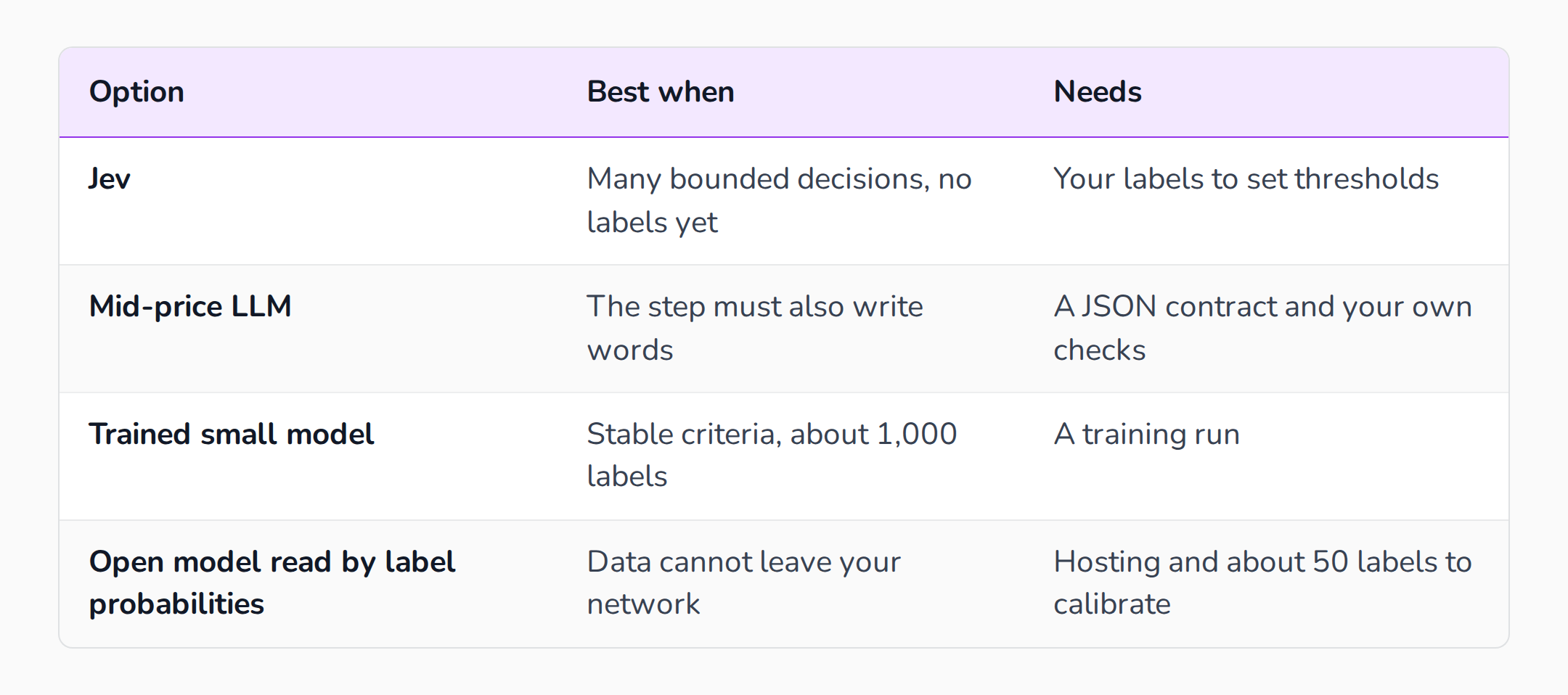
So a plain model can supply the label. Jev adds a probability for every option, at a lower price.
The author also let each model skip its least sure answers. Jev's own confidence ranked its answers usefully on both jobs, though on the second job Haiku stayed ahead on the same items Jev kept, and the author does not call Jev's number better behaved than other models'.
The same author found that Jev's separate confidence field on a Choice adds nothing beyond those probabilities.
If you have stable criteria and a thousand labels, a small model trained on them can win, as that commenter's 97.4% suggests.
If your data cannot leave your network, an open model read by its label probabilities gives the same typed interface. TypeSafe says it does not train on customer requests and offers zero data retention to enterprise customers, so check those terms first. Build to Launch's guide to open-source LLMs covers hosting and cost.
If the step must write words, use an LLM and let Jev check its work.
Add it in five steps
- Pick one decision with a closed answer set. Collect past records where the label is a human's final disposition, not an LLM's first guess. Write a one-line description for every option, and add a "none of these".
- Run it in shadow with a pinned model. In a shadow run, Jev answers your stored records while your current system keeps acting, and you compare its answers with the known labels. Use
jev-1.13.0on 1,000 to 2,000 records. With fewer labels, 50 to a few hundred still give a rough threshold. One pre-registered study of 5,721 calls cost $0.176 at list price. - Split broad judgments into narrow questions. Ask about market size, feasibility, and differentiation, then fit the weights on your labelled records with a simple logistic regression, as the phishing test did, instead of asking TypeSafe's example "rate this startup pitch". Send all of them in one request.
- Set the bands from your labelled results. Sort the answers by confidence, measure accuracy in each range, and put the act band where the error rate is acceptable. For example, if answers at 0.9 and above are right 98% of the time on your records and you can live with 2% errors, act automatically there and send the range below it for confirmation. Make destructive actions stricter than reversible ones. Log the request ID, question names, probabilities, and the threshold your code applied, and keep the state itself out of the log.
- Keep side effects and permissions in code. Pydantic says a guard built on Jev belongs alongside deterministic checks. LangChain's guard for tool calls leaves tool output out of the classifier input so fetched content cannot authorize its own execution, and pairs it with human approval where a person should sign off. Build to Launch's AI agents hub collects its production guides on agents.
Start with the shadow run in step two. It gives you the one number this guide cannot: how often Jev is right on your own records.
Sources
- TypeSafe: Introducing System One Models and Jev
- TypeSafe docs: System One
- TypeSafe docs: Quick start
- TypeSafe docs: API reference
- TypeSafe docs: Primitives
- TypeSafe docs: Choice
- TypeSafe docs: Score
- TypeSafe docs: Noul
- TypeSafe docs: Confidence
- TypeSafe docs: Confidence-gated routing
- TypeSafe docs: Models
- TypeSafe docs: Jev 1.13 jaggedness
- TypeSafe docs: How to build with TypeSafe
- TypeSafe docs: Jev with coding agents
- TypeSafe docs: Classification using confidence
- Pydantic AI docs: TypeSafe (Jev)
- OpenRouter: What Is Jev?
- Langfuse: Using TypeSafe's Jev for evals
- VentureBeat: Companies are putting Jev in charge of AI agent decisions
- DEV Community: Jev After Eight Days of Independent Tests
- THE DAILY BRIEF: TypeSafe's Jev Scores 62.6% Asked Once and 95% Split Five Ways
- PrimeLine: TypeSafe Jev vs Claude Code
- Kingy AI: TypeSafe Jev Review
- Build to Launch: Open-Source LLMs in 2026
- Build to Launch: AI Agents and Automation