ChatGPT Sites vs Lovable, Bolt and Replit: The Same App, a Different Exit
ChatGPT Sites builds hosted apps with a database and sign-in, as Lovable, Bolt and Replit do. They differ on whether the code can leave.
ChatGPT Sites builds hosted apps with a database and sign-in, as Lovable, Bolt and Replit do. They differ on whether the code can leave.
One published guide says ChatGPT Sites has no persistent data storage and no custom domains. OpenAI's documentation lists a 10 GB database and custom domains.
Both cannot be right. The documentation wins, because OpenAI wrote it for its own product.
ChatGPT Sites is OpenAI's builder for hosted websites and small web apps, in public beta inside ChatGPT.
It makes the parts Lovable, Bolt and Replit make: hosting, a database, sign-in and a custom domain.
Sites differs on exit: OpenAI documents no way to export a Site you build by prompting on the web.
What ChatGPT Sites builds
You describe a site in ChatGPT's Work mode, and ChatGPT builds it, shows a private preview, and publishes it to a URL when you say so. You can also start from a project folder on your own computer, through Codex in the ChatGPT desktop app.
OpenAI's own examples are dashboards, project trackers, launch calendars, prototypes, internal portals and reports.
One tester, whose company sells a competing publishing tool, asked for two near-empty pages. The build took 7 minutes 50 seconds. Sites scaffolded a Next.js app. In this test, a tiny request still produced a full app framework.
A Site can also remember things.
Sites offers a D1 relational database capped at 10 GB per Site, and R2 object storage with no fixed limit. A small file in the project declares which of the two a Site uses:
{
  "project_id": "<project-id>",
  "d1": "DB",
  "r2": null
}
That example is a Site with a database and no file storage. OpenAI's docs give it as written.
The same docs add Sign in with ChatGPT for public Sites, hosted secrets for API keys, and custom domains where the feature is available.
The other three build the same parts
Read the vendors' own documentation side by side. The parts line up.
Table: What each tool documents (as of 2026-10-08)
| Tool | Hosting and data | Sign-in | Custom domain | Code out | Paid entry price |
|---|---|---|---|---|---|
| ChatGPT Sites | Hosted URL; D1 database to 10 GB; R2 file storage | Sign in with ChatGPT | Where available | Documented only for a local project | Included with eligible ChatGPT plans in beta |
| Lovable | Lovable Cloud: database, storage, functions | Built-in user management | Paid plans | Two-way GitHub sync; code download | Pro, $25 a month |
| Bolt | Bolt Cloud: unlimited databases, file storage, server functions | Signups, logins, roles | Pro plan | GitHub sync | Pro, $25 a month |
| Replit | Managed PostgreSQL; App Storage | Replit Auth | Replit Domains | Zip download; GitHub | Core, $20 a month |
Each row comes from the vendor's own pages, listed under Sources. Prices are monthly list prices on the access date.
Lovable hosts your app and includes a built-in backend with a database, storage, authentication, realtime and functions. Bolt Cloud bundles hosting, domains, databases, authentication, file storage and server functions. Replit's managed PostgreSQL is built into every Replit App.
On capability, then, the four tie.
Where they differ: who opens it, and where the code goes
Sites ties private access to ChatGPT accounts. OpenAI's audience options run from owner-only to anyone on the internet, with named outside viewers in between.
For limited sharing, invited visitors must sign in with the account that received access.
The same tester reports that the documentation offers no passcode, email-domain gate or link expiry. Among the documented options, a client without a ChatGPT account can open a Site only if you make it public. The tester also saw an "Anyone with the link" option, and the docs do not say whether it needs an account.
The other three each write down a way for the code to leave.
- Lovable syncs two ways with GitHub on one branch at a time, and a Download codebase option sits in Project settings.
- Bolt commits each working change to a connected GitHub repository, so the history lives outside Bolt. In the rare case that both change at almost the same time, Bolt keeps its version and overwrites GitHub.
- Replit lets you download a project as a zip or push it to GitHub. A team admin can ban the zip download.
For a Site built on the web, OpenAI's pages describe no export.
The tester says the same. The review adds that export and search-engine indexing are both undocumented. Only one hands-on account of Sites turned up in this research, so the rest of the Sites picture here rests on OpenAI's pages.
A Site can keep its code on your disk, and every exit has a cost
Starting from a project on your own disk gives the code a way out. OpenAI writes that a Sites project links a local source project to hosting. Codex CLI can still edit and test that local project before you publish it, and a saved version maps to a Git commit. Start there. The source stays with you.
Leaving can cost something too, because Lovable states that there is no one-click migration from its built-in backend to your own Supabase project. You export the data. You connect Supabase to a new project. Then you rebuild the schema.
Lovable's exit is expensive but written down. Only the web-built Site has no documented way out.
Where else ChatGPT Sites stops
- Usage limits have no published numbers. Reaching a limit can prevent you from creating a Site, adding storage, or keeping a high-usage Site public.
- OpenAI states payments two ways. The Help Center says you can collect payments through a third-party processor. The developer docs list enabling financial transactions among the things not to do. Read both before you build a checkout.
- Some hosting patterns are unsupported. OpenAI says some frameworks, private networks, databases and background services aren't supported. Raw TCP connections are out.
- Every deployment is live. Every deployment URL is a production URL, so save a version and review it before you deploy.
Use Sites when your visitors have ChatGPT accounts
Use ChatGPT Sites when the people who open the app already have ChatGPT accounts, as a team dashboard, a tracker or an internal portal does. For a workspace-private Site, each visitor can bring their own connected apps.
Use Sites from a local Codex project when you want hosting handled. The code stays on your disk. Build to Launch's GitHub for non-programmers explains the repository side.
Open Lovable when the app needs a full-stack start and a GitHub copy you can sync in both directions, and open Bolt for hosting, a database and Stripe payments in one place. Open Replit when the app needs a real server, a scheduled job or an always-on process. Replit's docs say Static deployments aren't compatible with apps created using Agent, so those apps run on Autoscale, which adds servers as traffic rises, or on a Reserved VM, one dedicated server that never sleeps.
Owning the code does not review it. A 2025 disclosure found that Lovable-generated apps often lacked secure row-level security policies, and Lovable's own docs call its security checks not a full audit. Check any generated backend before real users arrive.
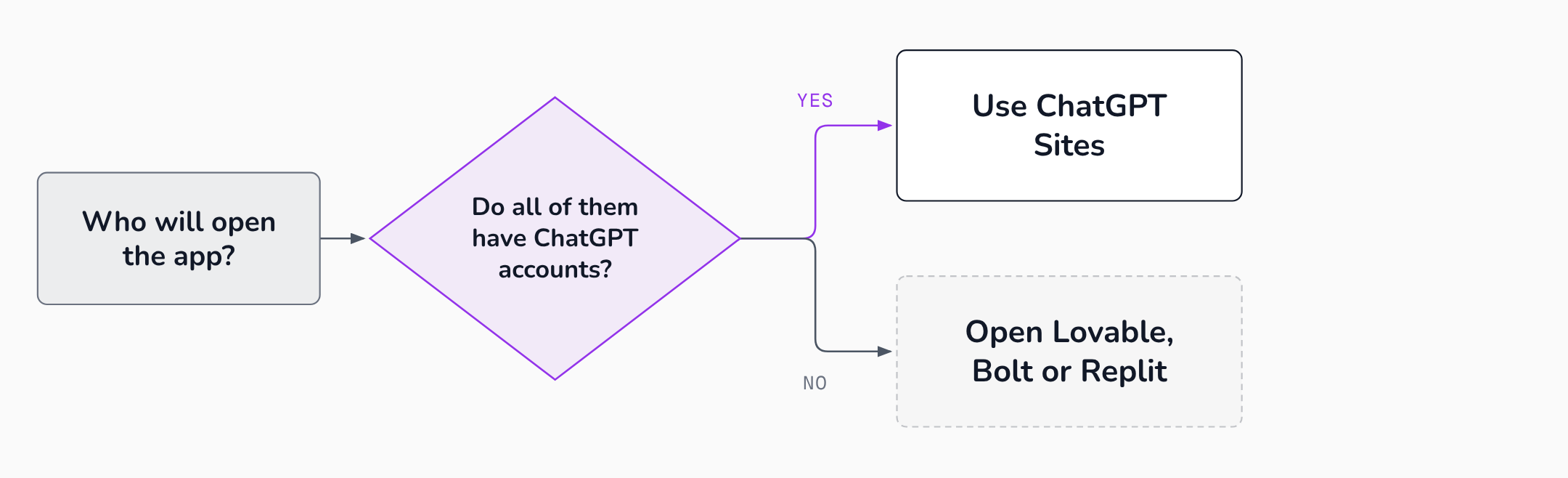 The audience decides first; the exit question then separates the three builders.
For the wider map of tools, start with Build to Launch's guide to vibe coding.
FAQ
Does ChatGPT Sites have a database?
Yes. Sites offers a D1 relational database capped at 10 GB per Site and R2 object storage with no fixed limit. You ask for durable storage in your prompt, and Sites declares it in the project's hosting file, as the example above shows.
Can you use a custom domain with ChatGPT Sites?
You can, where the feature is available. You connect an apex domain or subdomain you already own by changing its DNS records. Sites does not register domains. Custom domains are also unavailable in Enterprise workspaces at launch.
Can you export a ChatGPT Site?
OpenAI's documentation describes no export for a Site built on the web. A Site started from a local project keeps its source on your disk. The tester's review calls export undocumented.
Is ChatGPT Sites free?
Not every plan gets Sites. OpenAI says Sites is not available on Free or Go. During the beta, usage is included in eligible plans up to plan-specific limits.
Sources
- Creating and using ChatGPT Sites, OpenAI Help Center, accessed 2026-10-08.
- Sites, ChatGPT Learn, accessed 2026-10-08.
- Lovable Cloud, Lovable documentation, accessed 2026-10-08.
- Sync your Lovable project with GitHub, Lovable documentation, accessed 2026-10-08.
- Set up a custom domain, Lovable documentation, accessed 2026-10-08.
- Lovable vs Cursor: Full Feature Breakdown, Lovable, accessed 2026-10-08.
- What is Bolt Cloud?, Bolt Help Center, accessed 2026-10-08.
- Hosting, Bolt Help Center, accessed 2026-10-08.
- GitHub for version control, Bolt Help Center, accessed 2026-10-08.
- Plans and pricing, Bolt, accessed 2026-10-08.
- Deployment types, Replit documentation, accessed 2026-10-08.
- Pricing and Plans, Replit, accessed 2026-10-08.
- Agent Integrations, Replit documentation, accessed 2026-10-08.
- Manually copy a project to another workspace, Replit documentation, accessed 2026-10-08.
- GitHub for non programmers, Build to Launch, accessed 2026-10-08.
- Everything Vibe Coding: From First Prompt to Production App, Build to Launch, accessed 2026-10-08.
- What ChatGPT Sites is, and the three limits we still hit, Stacktree, accessed 2026-10-08.
- How to Use ChatGPT Sites to Build and Host Web Apps Without a Backend, MindStudio, accessed 2026-10-08.
- Statement on CVE-2025-48757, Matt Palmer, accessed 2026-10-08.