How to Add Claude to a Website So It Prefills Fields When the Page Opens
Call the Claude Messages API from your server with a JSON schema, and write the returned values into your form as editable suggestions. Three of the six Claude features you might consider are needed.
Atlassian describes a form-filling pattern. The page sends the form data to a model and asks for a JSON object where each field corresponds to a field in the form. The user edits the values before submitting.
To prefill form fields with Claude, call the Claude Messages API from your server with a JSON schema that matches the form. Write the returned values into the fields as suggestions the visitor can change. You need the Messages API, one client SDK, and structured outputs. Streaming and prompt caching are optional. The Agent SDK is not needed.
What happens between the page opening and a filled field
The visitor opens the page, and four things follow in order:
- The page script asks your server for suggestions.
- Your server sends Claude the context it has, such as the visitor's account details or the topic of the page, together with a schema that lists the fields.
- Claude returns JSON that fits the schema.
- The script writes each value into its field and labels it as a suggestion.
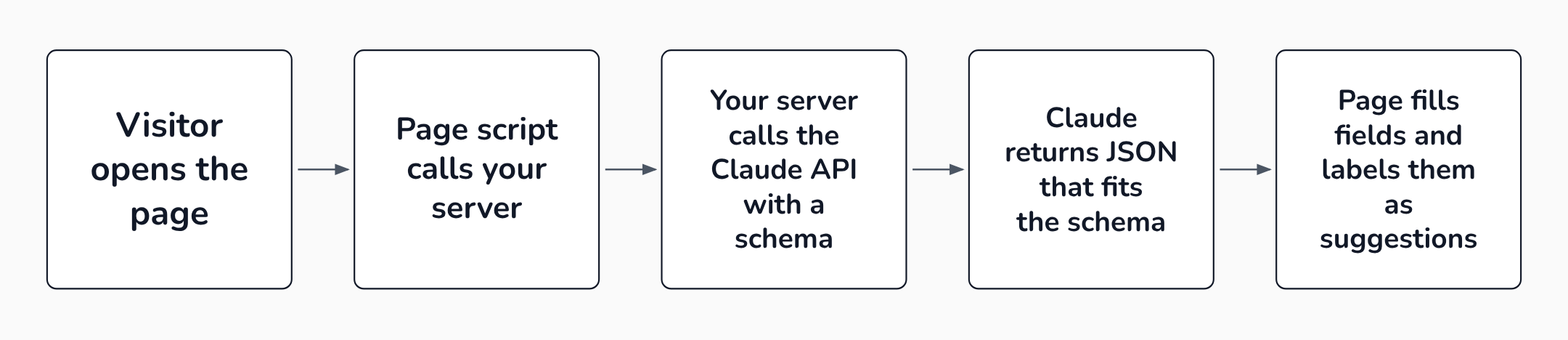 The API key stays on your server; the browser only talks to your own route.
Label every suggestion. A design-system write-up on AI form filling says users need a clear signal that the AI populated the field, and a one-action path to override it. The page submits nothing for the visitor. Every value stays editable.
Which Claude features this build needs
Claude's documentation lists several features that sound like they belong in this build.
Three of them do.
Table: What each Claude feature does and whether a page-open prefill needs it
| Feature | What it does | Needed here? |
|---|---|---|
| Messages API | The endpoint you send a prompt to and get a reply from | Yes |
| Client SDK | Wraps the API with headers, retries and streaming | Yes, in practice |
| Structured outputs | Forces the reply to match your JSON schema | Yes |
| Streaming | Sends the reply piece by piece as it is generated | Only for long text |
| Prompt caching | Reuses a repeated prompt prefix at a lower price | Only above a size minimum |
| Agent SDK | Runs Claude Code's agent loop and tools in your app | No |
Three features are needed, two are optional and one is not, as checked against the Claude Platform documentation on 2026-10-08.
The needed features start with the Claude API, a REST API at https://api.anthropic.com. The Messages API is POST /v1/messages.
The client SDKs cover Python, TypeScript, C#, Go, Java, PHP and Ruby.
Structured outputs make a form fill dependable. Without them, Claude can return malformed JSON or leave out a required field.
With a schema in output_config.format, the reply is constrained to the schema, so there are no JSON.parse() errors and the field types are guaranteed. If JSON is new to you, Build to Launch explains when to hand a model JSON and when to use Markdown or XML.
Keep the API key on your server
Every call to the Claude API carries a secret key, so the first design choice is where that key lives.
The TypeScript SDK puts browser use behind an option named dangerouslyAllowBrowser.
Its documentation says the option exposes your secret API credentials in the client-side code. It adds that any user with access to the browser can potentially extract and misuse them.
The API also accepts browser calls if you send the header anthropic-dangerous-direct-browser-access: true. Simon Willison wrote up the header when it appeared. He calls an embedded key a nasty anti-pattern.
He names two cases where it is fine: internal tools exposed to trusted users, and apps where each user supplies their own key.
A public page that prefills for visitors is neither.
The consequence shows up in a real repository. A security review of one open-source app filed a CRITICAL finding titled "Claude API key exposed in browser" for exactly this header. Its recommended fix was a backend proxy, the key held in an environment variable on the server, and authentication between the frontend and the backend.
So the page calls a route on your own server, and only that route talks to Claude. Put a limit on the route too, because it triggers paid calls for whoever reaches it.
Step 1: Write the schema for the fields Claude may fill
The context is whatever your server already knows about the visitor when the page opens, such as the signed-in account record or the topic of the page. The server looks it up from the visitor's session, so the page sends nothing.
List the form fields where that context supports a guess. Leave out anything Claude would have to invent, such as a password or a payment detail.
This schema adapts the documentation's raw JSON schema example, with form fields in place of its contact fields:
SCHEMA = {
    "type": "object",
    "properties": {
        "company_name": {"type": "string"},
        "team_size": {"type": "string", "enum": ["1-10", "11-50", "51+", "unknown"]},
        "use_case": {"type": "string"},
    },
    "required": ["company_name", "team_size", "use_case"],
    "additionalProperties": False,
}
Four rules from the structured outputs documentation shape how you write it:
- Every object needs
additionalPropertiesset tofalse. - Constraints such as
minimum,maxLengthandminLengthare not supported, so the schema cannot enforce them and your code has to check those values itself. - The API caps optional parameters at 24 and union-type parameters (fields that allow more than one type, such as a string or null) at 16, so mark fields
required. Give each enum (a field limited to a fixed list of values) anunknownvalue, and let Claude return an empty string for free text when the context says nothing. - Structured outputs cannot be combined with citations, which return a 400 error, or with message prefilling.
Claude may also return an enum value that differs from yours only in capitalization. The route in Step 2 normalizes it.
Step 2: Add the server route
The route takes the context, makes one Messages API call with the schema, and returns the parsed JSON.
Three parameters need a word before the code. max_tokens caps the length of the reply. system holds the standing instruction. stop_reason on the response says why Claude stopped, and Step 4 covers its two bad values. The sketch assumes the Python SDK is installed. Create the client once with anthropic.Anthropic() and keep the key in the server's environment variables.
The sketch uses only parameters that the documentation shows. VibeCoding.Builders did not run it.
import json
import anthropic

client = anthropic.Anthropic()
SIZES = ["1-10", "11-50", "51+"]

def suggest(context):
    try:
        response = client.messages.create(
            model="claude-opus-5-5",
            max_tokens=1024,
            system="Suggest values for the signup form from the context. Use an empty string when the context does not say.",
            messages=[{"role": "user", "content": context}],
            output_config={"format": {"type": "json_schema", "schema": SCHEMA}},
        )
    except Exception:  # 429, 529 and other API errors; narrow to the SDK's error classes
        return {}
    if response.stop_reason in ("refusal", "max_tokens"):
        return {}
    text = next(b.text for b in response.content if b.type == "text")
    result = json.loads(text)
    result["team_size"] = next((x for x in SIZES if x.lower() == result["team_size"].lower()), "")
    return result
Claude's answer arrives in a text block whose content is the JSON string, so the route reads that block and parses it. It returns an empty object after a caught API error, a refusal or a truncated reply. The page treats that as no suggestions, and the form works as before. The team_size line matches the value case-insensitively and turns unknown into an empty string.
Wire suggest to POST /api/suggest in your web framework. Look up the context from the signed-in session before you call it, and refuse requests that have no session. Then add a per-session limit in whatever layer already rate-limits your routes, such as one prefill call per page load and a refusal of repeats within a minute. The sketch skips both.
Once the route works, expect the first request with a new schema to be slower, because the schema is compiled into a grammar, the set of rules that limits what Claude may write. Compiled grammars are cached for 24 hours from last use. Later requests run faster. Keep the schema stable.
Step 3: Fill the fields when the page opens
The page script calls your route once on load. It fills only the fields the visitor has not touched, and it stops quietly if the call fails. The fetch sends no body.
async function prefill() {
  try {
    const res = await fetch("/api/suggest", { method: "POST" });
    if (!res.ok) return;
    const fields = await res.json();
    for (const [name, value] of Object.entries(fields)) {
      const input = document.querySelector(`[name="${name}"]`);
      if (input && value && !input.value) { input.value = value; markSuggested(input); }
    }
  } catch (e) { /* leave the form as it was */ }
}

function markSuggested(input) {
  const tag = document.createElement("span");
  tag.textContent = "Suggested ";
  const clear = document.createElement("button");
  clear.type = "button";
  clear.textContent = "Clear";
  clear.onclick = () => { input.value = ""; tag.remove(); };
  tag.append(clear);
  input.after(tag);
}
markSuggested is the label and the one-action override from earlier.
Step 4: Handle the replies that look like success
Two replies come back with HTTP 200 and still do not match your schema.
When Claude refuses a request for safety reasons, the response has stop_reason: "refusal" and you are billed for the tokens.
When the reply hits max_tokens, the JSON is cut off. A higher limit fixes it. The check in the Step 2 sketch covers both.
Handle transport errors as well. Three codes on the errors page matter here:
429withrate_limit_errorwhen you hit a limit.529withoverloaded_errorwhen the API is temporarily overloaded.413when a request is too large.
In every case the answer for the visitor is the same: leave the fields blank.
When streaming and prompt caching are worth adding
A short form needs neither feature. Streaming sets "stream": true. The reply returns as server-sent events, with text arriving in text_delta pieces.
Each text delta event carries a fragment of the reply, as in the documentation's example:
event: content_block_delta
data: {"type": "content_block_delta", "index": 0, "delta": {"type": "text_delta", "text": "ello frien"}}
The fragment can end mid-word, so your code appends fragments until the stream finishes. Streaming works with structured outputs, but a form of short values has nothing to show early, because the JSON is only usable once it is complete. Streaming helps when one field holds a long draft. You can display it as it grows.
Prompt caching pays off only when the same long prefix repeats. You mark it with cache_control. The cache lasts five minutes by default, refreshed each time it is read.
The API processes prompts shorter than the model's minimum without caching and without an error. That minimum is 512 tokens for Claude Opus 5.5 and Claude Sonnet 5.5 and 4,096 tokens for Claude Haiku 4.5, so a short form prompt may never qualify.
Two details decide whether caching works in this build:
- Changing
output_config.formatinvalidates the prompt cache for that conversation, so keep the schema constant. - A cache entry only becomes available after the first response begins, so concurrent page opens do not share it until one has started.
Why the Agent SDK stays out of this route
The Agent SDK gives you the same tools, agent loop, and context management that power Claude Code. It runs the Claude Code binary in a process you operate.
Its built-in tools read and write files, run commands and search the web. A page-open prefill needs one bounded call with no tools. The Messages API already does that.
Reach for the Agent SDK when the suggestion has to come from reading files or running commands on your server.
Treat the context you send as untrusted
If the context includes text a visitor or a third party wrote, that text can steer the reply.
OWASP defines indirect prompt injection as an LLM accepting input from external sources such as websites or files, where the content alters the model's behavior in unintended ways.
The schema limits what the reply can look like, so an injected instruction cannot add a new field. It can still steer a value, so a value that fits the schema may be wrong.
Validate each value on your server. Keep the visitor as the one who submits. Never let a suggested value trigger an action on its own.
FAQ
Which Claude model should a page-open prefill use?
Anthropic's models overview says to start with Claude Opus 5.5 for most workloads. For a short, high-volume call, test a cheaper model on your own examples.
As of 2026-10-08, the published prices per million tokens are:
- $4 input and $20 output for Opus 5.5.
- $2 and $10 for Sonnet 5.5.
- $1 and $5 for Haiku 4.5.
How much does one page-open call cost?
Cost depends on your prompt size.
As an illustration, a call with 2,000 input tokens and 300 output tokens costs about $0.014 on Opus 5.5 ($0.008 for input plus $0.006 for output). On Haiku 4.5 it costs about $0.0035, using the prices above. Your own token counts will differ.
Does structured output guarantee the values are correct?
It guarantees the shape in most cases. The exceptions are listed on the structured outputs page: refusals, max_tokens cut-offs, and enum values that differ in capitalization.
Whether team_size matches the visitor's real team is a question about the context you sent. That is why the visitor reviews every suggestion.
Sources
- Claude API overview, Anthropic, accessed 2026-10-08
- SDKs, CLI, and libraries, Anthropic, accessed 2026-10-08
- Structured outputs, Anthropic, accessed 2026-10-08
- Streaming messages, Anthropic, accessed 2026-10-08
- Prompt caching, Anthropic, accessed 2026-10-08
- TypeScript SDK, Anthropic, accessed 2026-10-08
- Agent SDK overview, Anthropic, accessed 2026-10-08
- Claude API errors, Anthropic, accessed 2026-10-08
- Models overview, Anthropic, accessed 2026-10-08
- LLM01:2025 Prompt Injection, OWASP Gen AI Security Project, accessed 2026-10-08
- AI User Experience Patterns, Atlassian, accessed 2026-10-08
- AI UX Patterns Every Design System Should Ship, reloadux, accessed 2026-10-08
- Claude's API now supports CORS requests, Simon Willison, accessed 2026-10-08
- CRITICAL: Claude API key exposed in browser #71, GitHub, accessed 2026-10-08
- LLMs Don't Read, They Parse, Build to Launch, accessed 2026-10-08